
Once you know how to check your Qatar visa status online and see it come back as Approved, this guide covers everything that comes next: downloading and printing your visa copy, confirming it’s genuine before you travel, and what to do at the airport once you land.
This process looks slightly different depending on whether you applied through the MOI portal directly, the Hayya platform, or had a sponsor handle it on your behalf, but the core steps below apply across all visa categories.
Need the basic lookup steps for a visa or Qatar ID number? See our Qatar Visa & ID Check guide.
How to Check Your Qatar Visa Status Online: Quick Overview
If you haven’t already, here’s the fastest way to check your Qatar visa status online before diving into the next steps below:
log into the MOI portal or Hukoomi app and go to Inquiries → Visa Services. Once your status shows Approved, follow the steps below to download, verify, and prepare for travel.
Step 1: Download and Print Your Approved Visa
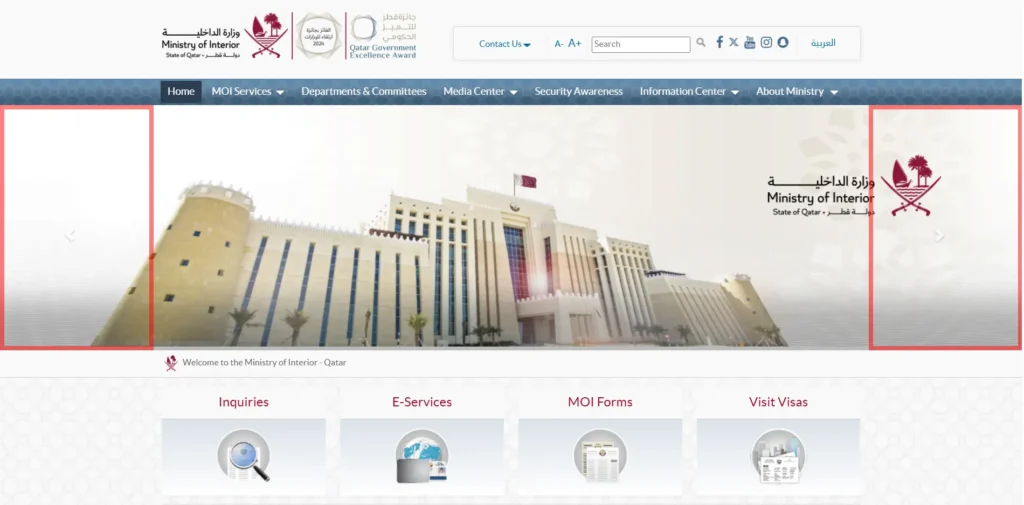
- Log in to the MOI portal or the Hukoomi app using the same credentials/passport details used at application.
- Go to Inquiries → Visa Services and locate your approved visa record.
- Select Print/Download this generates the official PDF copy of your visa.
- Print at least two physical copies: one for immigration at the airport, one to keep with your sponsor’s documents.
If you applied through a sponsor or company, they may have received the copy directly, cross-check with them if you can’t locate it yourself.
Step 2: Verify the Visa Is Genuine
Before you travel, it’s worth confirming your visa copy matches an official MOI record, especially if it was forwarded to you by a recruitment agent rather than downloaded directly. Fake or altered visa copies are a known scam risk. If you obtained your visa through a third party, see our guide to using a Qatar visa agent for how to vet an agent before paying any fees.
Step 3: Check Entry Requirements Specific to Your Visa Type
Your download is confirmed genuine, now make sure you meet the entry conditions tied to your specific visa category:
- Tourist / Visa on Arrival travelers: review the 2026 Visa on Arrival rules, including the Discover Qatar hotel booking requirement.
- Hayya Card holders (for events): confirm your card is linked correctly, see how to get a Hayya visa.
- Business visit visa holders: review business visit visa requirements.
- Family visit visa holders: double check requirements haven’t changed since approval via our family visit visa requirements guide.
- Transit passengers: if you’re only passing through Doha, see our Doha transit visa guide.
Common Status Messages Explained
Once your visa shows as approved, you may still see a few different labels depending on your visa type: “Ready to Print” means your visa file is finalized and available for download. “Issued” typically appears for sponsor-processed work and family visas. “Active” usually applies to Hayya e-visas once payment is confirmed. If your status shows something unexpected or inconsistent with these, it’s worth revisiting the MOI processing stage tracker to rule out a system delay before assuming there’s an error.
Step 4: What Happens at the Airport
- Present your printed visa copy along with your passport at immigration.
- If it’s your first entry as a resident (work, family, or student visa), you’ll typically be scheduled for biometric enrollment, see our MOI biometric enrollment guide.
- Frequent travelers can also register for expedited processing, check our Doha Airport Smart Gate registration guide.
Have your printed visa, passport, and any supporting documents (employment contract, hotel booking, or return ticket depending on your visa type) easily accessible before you reach the immigration counter, this speeds up processing significantly during peak arrival hours. Immigration officers may ask a few basic questions about the purpose of your visit or length of stay, especially for first-time entries. Keep your answers consistent with what’s stated on your visa application to avoid unnecessary delays.
After You’ve Landed: What to Check Next
- Residency permit / QID progress: once biometrics are complete, your QID processing typically takes 1-3 weeks, contact your sponsor if it’s delayed beyond that.
- Health Card registration: required for accessing public healthcare; see our Qatar Health Card check guide.
- If your visa gets cancelled later: (job change, employer issue, etc.), see our visa cancellation status check guide.
Frequently Asked Questions (FAQs)
I can’t find my approved visa PDF, what do I do?
Check with your sponsor or agent first, since some visa types are issued directly to the sponsoring company. If genuinely missing, revisit the MOI portal’s Visa Inquiry section under your passport number.
Do I need to print my visa if I have it on my phone?
A physical printed copy is still recommended for airport immigration, even though most checks are done digitally.
How do I know my downloaded visa hasn’t been tampered with?
Cross-check it against our original vs fake visa verification guide, which lists the specific security features to check.
Is this the same as tracking a pending application?
No, this guide assumes your visa has already been approved. For applications still in progress, see our MOI processing stage tracker.