Qatar Visa Check
|

Qatar Visa Check & ID Online 2026: A Complete MOI Step-by-Step Guide

Applying for an entry permit or waiting for your residency card in Qatar can be an anxious period. If your application status has been stuck on “Under Process” for several days, you might start wondering if there is an issue with your documents. Similarly, living or working in the country without a valid identity card can result in serious fines, travel bans, and complications with your residency status.

In 2026, the Ministry of Interior (MOI) further streamlined its digital services. This updated, all-in-one guide walks you through every official method to perform a Qatar Visa Check and a Qatar ID check online. By following these steps, you can monitor your documentation status, verify validity dates, and ensure you stay completely compliant with local immigration laws.

Essential Requirements for Online Verification

Before you visit the official government platforms, ensure you have the following information ready. Having these details correct will prevent the most common “No Record Found” system errors:

  • Passport Number: This must be entered exactly as it appears on your passport, including any alphanumeric prefixes. Do not use special characters or spaces.
  • Nationality: Ensure you select the exact nationality that matches your travel document, not your current country of residence.
  • Application/Visa Number: This is usually found in the confirmation email sent by the MOI or your corporate visa sponsor.
  • QID Number: Your unique 11-digit residency number (required for existing residents and expats).

4 Official Methods to Verify Your Qatar Visa & QID Status

Checking your status is simple through official portals. However, if your visa requires pre-travel steps, the process might differ. For instance, if you need to book biometric or medical slots, follow our guide on Qatar Visa Center appointments. Alternatively, if you are an international traveler flying with a short layover, you can explore Doha by checking the requirements for a Doha Transit Visa.

Method 1: Check Qatar Visa by Passport Number (MOI Portal)

The Ministry of Interior (MOI) portal remains the absolute primary source of truth for all entry permissions. Whether you hold a business visa, a family visit visa, or a work entry permit, this is the most reliable tool to process a moi visa qatar status lookup.

To perform a successful moi visa check online, follow these official steps:

Open your web browser and go directly to the official government portal: portal.moi.gov.qa.

MOI Offical Website

Locate and click on the Visa Services icon on the homepage.

Visa Services

From the list of available choices, select the Visa Inquiry & Printing option.

Visa Inquiry & Printing


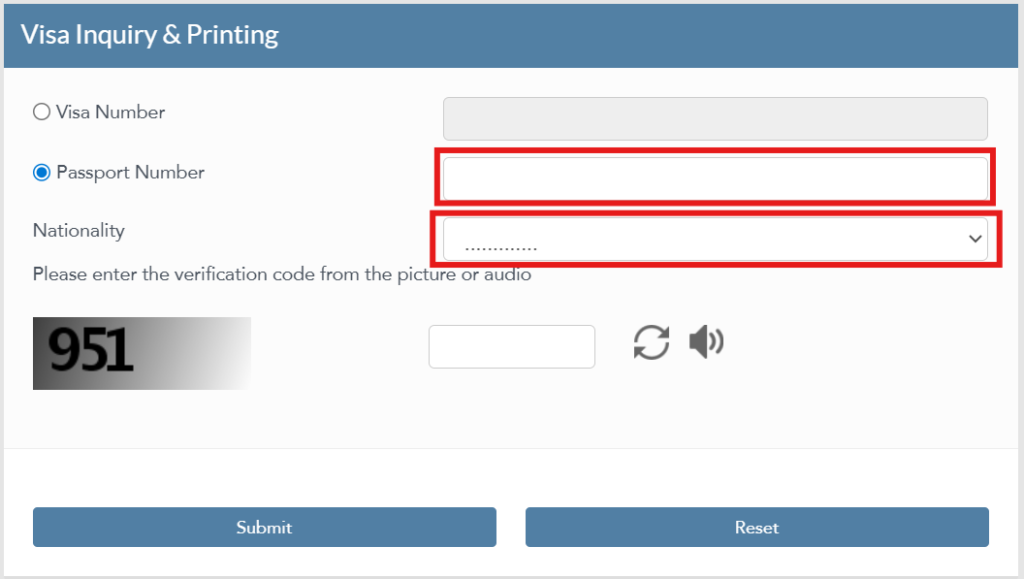
To check qatar visa by passport number, select the passport radio button as your primary search method.

passport

Enter your passport number accurately and select your correct nationality from the dropdown list.

Input the verification CAPTCHA security code displayed on the screen and click Submit.

If your application has been approved, your complete details will display on the screen instantly. From here, you can seamlessly utilize the integrated qatar visa inquiry and printing service to save or print a verified PDF copy for your upcoming travel records.

Method 2: MOI Qatar ID Check Online (Using QID Number)

For residents, expats, and professionals already inside the country, running a regular MOI Qatar ID inquiry is vital to monitor residency health. No registration or login credentials are required for a basic Qatar ID card status online lookup. Apart from checking your visa status, ensuring your healthcare access is equally important. You can easily perform a Qatar Health Card Check online to track your expiry date and renewal status via the official Hukoomi portal.

Follow this step-by-step MOI Qatar ID check process:

  1. Access the official portal.moi.gov.qa website.
  2. From the main dashboard, click on the Inquiries icon.
  3. Select Other Inquiries from the submenu list.
  4. Click on the Official Documents service link.
  5. Choose Qatar ID or Residence Permit from the document type options to initiate the MOI Qatar ID checking system.
  6. Enter your 11-digit QID number in the designated input field.
  7. Complete the simple on-screen CAPTCHA verification and click the Search button.

The system will instantly output your current residency status, along with the official issue date and final expiry date.

⚠️ Important Security Note: Always conduct your tracking exclusively through the official portal.moi.gov.qa domain. Avoid unauthorized third-party look-up portals that may harvest your sensitive personal documentation data.

Method 3: Qatar ID Download & Digital Wallet via Metrash2 App

Qatar ID Download

Knowing your data is helpful, but having instant digital proof on your smartphone is vital. In 2026, Qatari authorities officially recognized digital copies of residency cards for most government, private sector, and banking transactions.

To complete a secure Qatar ID Download, utilize the official Metrash2 mobile application:

  1. Download the Metrash2 app from the Apple App Store or Google Play Store.
  2. Log in using your valid QID number and your registered mobile number (this requires an active OTP verification).
  3. Tap on the My Documents section or select the Wallet icon directly from the home dashboard.
  4. Your official MOI Qatar ID will appear as a verified digital card complete with your latest photo.
  5. Tap the Qatar ID Download option to save it securely to your local storage or take a clean screenshot.

How to Generate an MOI Qatar ID Check Print Receipt

For official tasks like opening a bank account, setting up a post-paid mobile network line, or legal filings, a physical paper receipt may still be required. Once your valid status result appears on the web portal during your online check, click the integrated print icon. This instantly generates a clean, official MOI Qatar ID check print confirmation bearing the Ministry’s letterhead, which serves as physical proof of valid residency.

Method 4: Qatar ID Check by Passport Number (Without QID)

If you are a newly arrived professional and your physical residency card hasn’t been issued yet by your employer, you can still track your baseline residency status using your travel passport details. This specific tracking method is ideal for new employees waiting for their background documentation to clear, or dependents whose residency paperwork is currently in active production. In fact, if you want to track your entry permit, you can also perform an MOI Qatar visa check before your physical card is issued to ensure your entry papers are completely cleared.

To verify your documents using this method, follow these steps:

  1. Go to the official MOI Portal and navigate to Inquiries $\rightarrow$ Other Inquiries $\rightarrow$ Official Documents.

  2. Instead of entering an 11-digit QID, select the Passport Number option.

  3. Choose your exact Nationality from the mandatory dropdown menu for system cross-referencing.

  4. Enter your passport number exactly as it appears on your travel document.

  5. Solve the CAPTCHA and click Search.

Your live database record will display whether your formal residence permit has been approved in the backend system, helping you verify processing stages before biometrics are completed.

Tracking Your Qatar ID Check Renew Status

A residency renewal is typically initiated by your company’s corporate PRO. However, tracking your Qatar ID check renew progress independently protects you from accidentally overstaying on a lapsed permit.

QID Renewal Process Breakdown

Renewal Stage What to Expect How to Verify Status
Application Submitted PRO submits renewal via MOI Business Portal. Ask your PRO for the application reference number.
Medical & Biometrics If required, you will be notified for a health clinic visit. Check MOI portal; status will show “Under Process”.
Renewal Approved A new expiry date is officially issued in the system database. Run a quick check online; the updated expiry year will appear.
Physical Card Printed A new physical card is dispatched or collected by your employer. PRO delivers the card directly to you.


⚠️ Critical Warning:
Never assume your residency renewal is fully finalized just because your sponsor or employer verbally said so. Always run an online check yourself to confirm that the new, extended expiry date is actively showing live in the system. Fines for overstaying begin accumulating the moment the formal grace period ends.

Understanding Your Qatar Visa Status Messages

Status Meaning & Action Required
Under Process Your documentation is safely with immigration. No action is required unless it stays in this state for over 10 working days.
Ready to Print / Approved Your visa is fully valid! Utilize the official printing service to download the PDF immediately.
Rejected There is an issue with your application data. Contact your visa sponsor or corporate PRO to request the official rejection cause.
Expired The visa was successfully issued but you did not physically enter Qatar within the standard 90-day validity timeframe.
No Record Found This indicates a structural typo in your passport digits or that the sponsor hasn’t uploaded the application to the portal yet.

Common Mistakes to Avoid During the Process

Many travelers face unnecessary delays because of small, avoidable data errors during the online checking process:

  • The Invisible Space Bar Error: A very frequent error is accidentally hitting the space bar after typing your passport number. Even an invisible space at the end will cause the database to return a frustrating “No Record Found” error.
  • Clear Browser Cache: If the MOI portal pages appear stuck or the verification CAPTCHA image fails to refresh, open your browser in “Incognito Mode” or clear your browser’s cookies.
  • Avoid Third-Party Sites: Never input your sensitive passport or QID information into unverified blogs or unofficial look-up tools. Always ensure the address bar shows the secure .gov.qa extension.

Important Travel Requirements for 2026

Once your visa status shows approved, ensure you complete these essential entry protocols before booking your flight to Doha:

  1. Mandatory Health Insurance: All visitors entering Qatar must hold a valid health insurance policy from a registered Qatari insurance provider. This can be purchased online before departure for approximately 50 QAR.
  2. Passport Validity: Your passport must possess a minimum validity of six months from your exact date of touchdown in Qatar to pass immigration smoothly.
  3. Physical Printouts: Even though digital wallet copies are widely accepted across Doha, always carry a physical paper printout of your visa approval and insurance policy as a backup against system outages at boarding gates.

Frequently Asked Questions (FAQs)

Can I check my status without an application number?

Yes. You do not need a specific application tracking number if you choose to search by your passport details. You only need your valid passport number and your correct nationality to retrieve live records from the MOI database.

What should I do if my status is stuck on “Under Process” for too long?

If your visa status remains unchanged for more than 10 working days, it is best to contact your sponsor or visit the nearest Qatar Visa Center (QVC). This usually indicates that additional background verifications or clearer document scans are required.

What is the official website for Qatar visa check?

The official, authorized government domain for all public visa and residency verifications is portal.moi.gov.qa.

What is the grace period after the Qatar ID expires to renew without fines?

Qatar officially provides a 90-day grace period after the exact QID expiry date to complete the renewal process without penalties. If you fail to renew within this 3-month window, a fine of 10 QAR per day will automatically start accumulating.

Last updated: 2026 | Information sourced from official MOI Qatar portals and Metrash app guidelines.

Similar Posts

Leave a Reply

Your email address will not be published. Required fields are marked *