
If you have already visited a Qatar Visa Center (QVC), the next step is Qatar Visa Center appointment status tracking, checking exactly what stage your file is at? The good news is that QVC gives you a way to track this yourself, without needing to call anyone or wait for updates from an agent.
This guide walks through how the tracking system works, what each status actually means, common errors people run into, and what to do if your fingerprint scan keeps failing.
For a refresher on how the initial appointment booking works, see our guide on Qatar Visa Center appointments. QVC centers exist in major labor-sending countries and handle the pre-departure checks, biometric enrollment, contract verification, and medical screening, so that once you land in Qatar, most of the heavy paperwork is already done.
Qatar Visa Center Appointment Status Tracking: Step by Step
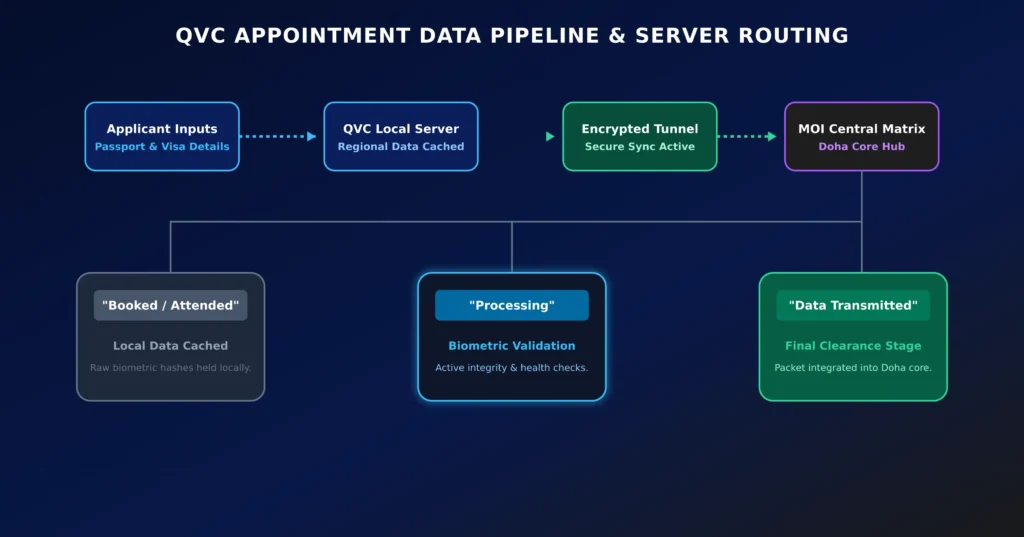
To check your status, you will need your passport number and the visa reference number provided by your employer or the Ministry of Interior (MOI). Once you enter these on the QVC tracking portal, you will typically see one of the following statuses:
- Booked / Attended: This confirms your appointment took place and your biometric and medical data has been recorded locally at the center.
- Processing: Your submitted data (fingerprints, photo, medical samples) is being reviewed and verified. This step can take a little time, especially during busy periods.
- Data Transmitted to MOI: This means your file has been successfully sent to Qatar’s central immigration system in Doha. Once you reach this stage, it’s worth doing a Qatar visa check to confirm your visa approval is moving forward, or checking your medical report status if your medical results are still pending.
If your status stays on “Processing” for more than a few days, it does not necessarily mean something is wrong; it usually just reflects normal processing volume rather than a rejected application.
Common Reasons for Tracking Errors
A few things can cause the tracking portal to show an error, a blank result, or a stuck status:
- High traffic delays: During peak application periods, data transfers between the local QVC center and the MOI’s central database can take longer than usual, which may cause temporary delays in status updates.
- Repeated refreshing: Refreshing the tracking page too many times in quick succession, or checking from multiple devices at once, can occasionally trigger a temporary lock as a security measure. If this happens, simply wait a short while before trying again.
- Name or spelling mismatches: If your name is entered slightly differently between your passport, your sponsor’s application, and the QVC system (for example, extra spaces or different spelling of the same name), the tracking system may fail to find a match. If you suspect this is the issue, contact your sponsor or the QVC center to confirm the details on file match exactly.
What If Your Fingerprint Scan Fails?
Fingerprint issues are fairly common at biometric centers, especially for manual laborers, older applicants, or anyone with dry or worn fingertips. Here’s what typically helps:
- Ask the technician to retry the scan. QVC staff are used to this and usually have simple in-house methods (like a quick hand wash or a different scanning angle) that improve the reading.
- Request a supervisor review if it keeps failing. If the scan does not go through after a few attempts, ask the on-site supervisor to log the issue formally rather than leaving without resolution. This ensures your case is escalated instead of getting stuck.
- Bring medical documentation if you have a genuine condition. If you have a skin condition, permanent scarring, or another condition that affects your fingerprints, a letter from a registered doctor can help the center apply an appropriate alternative verification method. Always confirm with the specific QVC center what alternative process they use, since this can vary.
What Happens After Your QVC Step Is Complete
Once your data is fully transmitted and processed, your file moves forward to your sponsor for the next stage, typically visa printing and final travel arrangements. Because your biometrics and medical clearance are already on file, you generally will not need to repeat these steps again once you arrive in Qatar; your remaining tasks after landing usually involve local ID processing rather than starting over.
Typical QVC Processing Times
Frequently Asked Questions
Can I reschedule my QVC appointment if I miss my time slot?
Yes. If you miss your scheduled slot, most portals apply a short cool-down period before allowing you to rebook. Once that period passes, you can log back in and select a new available slot without losing any fees already paid.
What should I do if the tracking page shows an error for several days?
Try clearing your browser cache or accessing the portal from a different device or network first. If the issue persists, your sponsor can raise a support request with the MOI or QVC directly, referencing your specific case number.
Is there an alternative process for older applicants or people with damaged fingerprints?
Yes, QVC centers generally have an alternative verification process available for cases where fingerprint scanning isn’t reliable, often involving additional ID checks or documentation. It’s best to raise this with the center staff directly when you arrive, so they can guide you through the correct process for your situation.