
Few things are more frustrating than completing a detailed travel application only to be stopped at the final hurdle. If you are staring at a blank screen or an error message after trying to finalize your Qatar entry permit, you are not alone. Experiencing a Qatar visa payment gateway failure is a common roadblock for international travelers, but it is entirely fixable.
When your transaction freezes, the clock is often ticking on your travel plans. This comprehensive guide delivers the definitive hayya visa payment failed solution to help you bypass technical glitches, resolve banking blocks, and successfully secure your entry into Qatar.
Why Your Hayya Entry Permit Payment Error is Happening
Before you attempt to resubmit your details, it is crucial to understand why the official Hayya portal transaction issues occur. Most failures do not stem from a problem with your eligibility, but rather from strict cross-border security protocols and system timeouts. If you are trying to bypass these technical hurdles or looking into alternative entry options altogether, it is highly recommended to understand the true legal landscape regarding the Qatar free visa reality and official process to ensure your documentation remains completely compliant.
1. International Transaction Blocks and Fraud Triggers
Most standard debit and credit cards have default security blocks against overseas e-commerce merchants. When the Hayya system attempts to process the transaction through a Qatari banking gateway, your domestic bank may flag it as suspicious activity, causing an instant Hayya entry permit payment error.
2. 3D Secure (3DS) OTP Timeouts
The Qatari government’s payment gateway enforces maximum encryption standards. If your bank takes too long to send the One-Time Password (OTP), or if your network delays the SMS delivery, the payment session will automatically expire for security reasons.
3. Card Network Incompatibility
The official portal optimized its backend for major global networks like Visa and Mastercard. If you are attempting to use local domestic-only debit cards, prepaid travel cards, or certain American Express cards, the system may reject the payment structure entirely.
If you are unsure whether your underlying application is structurally sound before paying, review the complete breakdown on how to get Hayya Qatar visa to ensure your basic profile submission is correct.
The Step-by-Step Hayya Visa Payment Failed Solution
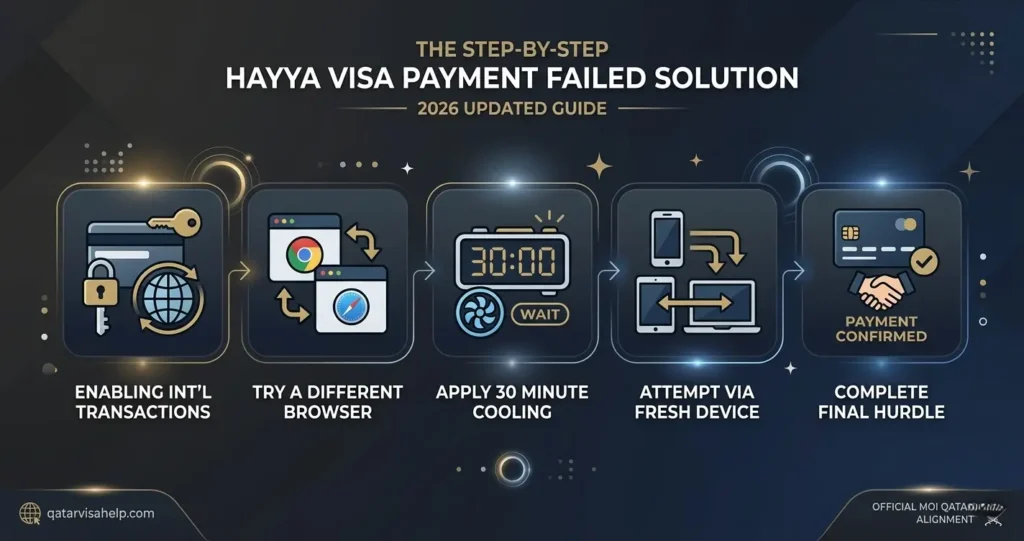
If you are caught in a loop of payment declines, follow these verified technical and banking workarounds to clear the bottleneck.
Step 1: Activate Cross-Border Permissions
Before making another attempt, open your mobile banking app or call your bank’s customer service line. Explicitly request them to lift geographical restrictions for online merchants in Qatar. Inform them of the exact Qatar visa price you are attempting to pay so they can pre-authorize the specific amount.
Step 2: Cleanse Your Browser State or Switch Devices
The Hayya portal heavily caches user data to maintain secure sessions. If a payment fails once, the browser often stores that failure token.
- Open an Incognito/Private window in Google Chrome or Microsoft Edge.
- Clear your browser cookies and cache entirely.
- Alternatively, switch from a desktop browser to the official Hayya to Qatar mobile application, which often features a more streamlined payment API connection.
Step 3: Implement the “Cool-Down” Window
Repeatedly clicking the submit button after a decline triggers automated fraud prevention protocols on the Hayya server. If you experience a rejection, close the tab and wait at least 20 to 30 minutes before attempting the payment again. This allows the gateway session to completely reset.
⚠️ Critical Security Warning
Do NOT click “Refresh” (F5) or the “Back” button while the payment gateway is processing. Doing so can result in duplicate charges on your card or cause the system to freeze your application due to perceived double-submission fraud. If the screen spins for more than two minutes, close the tab entirely and check your bank statement before trying again.
Troubleshooting Summary: Errors vs. Instant Solutions
Distinguishing Payment Drops from Application Rejections
It is vital to distinguish a simple gateway failure from deep-seated administrative problems. If the portal allows you to reach the billing stage but fails to process the funds, you are dealing with a purely transactional issue.
However, if the system blocks you from paying because your application status changes to “Rejected,” a payment workaround will not save it. For instance, administrative denials frequently stem from clerical errors, mismatched passport details, or security flag triggers. Understanding the nuances behind a Qatar visa application rejected reason can help you determine if you need to fix your documentation rather than your credit card.
Similarly, if you are coordinating travel for dependents, ensuring your paperwork aligns with the updated guidelines for avoiding a Qatar family visa rejection will protect your application from being locked out before you even reach the payment terminal. Keep in mind that outstanding regulatory issues in the country such as clearing a Qatar health card check or resolving an outstanding Qatar visa fine 2026 policy penalty must be fully settled before the state issues new entry permits.
Frequently Asked Questions (FAQs)
What should I do if my bank account was debited but the Hayya status still says “Pending Payment”?
Do not panic or repay immediately. This indicates a synchronization delay between your bank and the Qatari gateway. Wait up to 24 hours; the system usually reconciles automated payments. If the status doesn’t update, download your official bank statement showing the transaction ID and email it to the official Hayya support channel.
Can I use someone else’s credit card to execute my “hayya visa payment failed solution”?
Yes. The Hayya portal does not strictly mandate that the name on the credit card matches the name of the visa applicant. You can utilize a card belonging to a family member or friend, provided their bank supports international 3D Secure OTP authentication.
Is there an alternative payment method if my cards keep failing?
If you have tried multiple cards and continue experiencing failed international online transactions, try linking your card to an alternative supported wallet provider if prompted at checkout, or attempt the payment using a corporate credit card, which typically features higher international spending thresholds and fewer fraud triggers.
Where can I find the official application steps if I need to restart?
If your payment issues have corrupted your current session beyond repair and you need to launch a completely clean application profile, you can follow the official streamlined process on how to apply for Qatar visa online to ensure a flawless data entry setup.